Resources · Knowledge hub
Everything you need to run and grow an ICC
Past editions of The Bridge, governance documents, brand tools, learning resources and a searchable library, all in one place.
Popular:
Brand guidelines
Statutes
The Bridge
Global grants
Most downloaded
ICC Visual Identity Guidelines
Brand
118 MB · May 2026
↓
ICC Statutes
Governance
1.2 MB · Sep 2026
↓
The Bridge — September 2026
Newsletter
00 pages · Sep 2026
↓
How to establish an ICC
Guide
800 KB · 2026
↓
01 · The Bridge
The Bridge archive
ICC's newsletter, published as a digital newsletter and as a print magazine for yearly recaps. Every edition since the first issue.

ICC Newsletter
The Bridge — September 2026
Edition 00 · Sep 2026
A summary of this edition's highlights, featured stories and messages from the Executive Council.
In this edition
President's message
Featured cross-border project
Upcoming events and forums
All years
2026
2025
2024
2023
Older
All
Digital
Print magazine
ICC Newsletter
The Bridge
Edition 00
ICC Newsletter
The Bridge
Edition 00
ICC Newsletter
The Bridge
Edition 00
ICC Newsletter
The Bridge
Edition 00
ICC Newsletter
The Bridge
Edition 00
ICC Newsletter
The Bridge
Edition 00
02 · Governance
Guidelines, policies and governance documents
The official documents that govern how ICCs are organised and run. Documents marked Members only are available to signed-in section members and officers.
All
Governance
Policies
Guidelines
Forms
Reports
Document
Updated
Languages
03 · Brand Centre
ICC Brand Center
A consistent voice and visual identity are essential components of a strong brand. Everything on this page follows the ICC Visual Identity Guidelines (May 2026), aligned with the Rotary Master Brand.
On this page
Visual Identity Guidelines
May 2026 · 30 pages · PDF 118 MB
1/
Logos
Use the ICC logo exactly as supplied. Never redraw, recolour or stretch it, and never combine it with logos other than Rotary's.
1.1 The ICC logo
INTERCOUNTRY
COMMITTEES
Portrait · master logo
Can be used on its own, especially where space is limited.
PNG · SVG · PDF
INTERCOUNTRY
COMMITTEES
Landscape
A standalone version; the space beneath it can take a committee, district or country name.
PNG · SVG · PDF
INTERCOUNTRY
COMMITTEES
Monochrome & white
Grey, black or Rotary Royal Blue. A white transparent PNG is available for photos and coloured backgrounds.
PNG · SVG · PDF
1.2 Lock-ups with Rotary
Why the lock-up matters
It creates a consistent visual link between ICC and Rotary, reinforcing credibility, recognition and brand coherence.
Why Rotary's logo is included
It shows ICC's official connection to Rotary International and draws on the trust and global strength of the Rotary brand.

Generic lock-up
Executive Council
With district descriptor
D9220 - D9010
With country descriptor
Zambia - Mauritius
No other logos may be added to a lock-up. Descriptors (districts or countries) are added only through the lock-up generator in the Rotary Brand Center.
1.3 Create your section's lock-up
1
Download the 2026 ICC base logo
From the logo downloads above.
2
Open the lock-up template
In the Rotary Brand Center (sign-in required).
3
Type your ICC section's full name
It appears as the descriptor.
4
Choose "Upload partner logo"
In the Type menu of the second panel.
5
Upload the ICC base logo
Browse to the file on your computer.
6
Pick a file format and download
In the third panel.
2/
Typography
Rotary International recommends Open Sans and Georgia: both are free and readily available on Mac and Windows.
Aa
Headlines
Open Sans
Uniting Rotarians across borders
Titles · headlines · subheadings · emphasis
Aa
Body copy
Georgia
Intercountry Committees connect clubs and Rotarians in different countries to promote friendship and peace.
Body copy · longer reading content
Open Sans Semi Condensed is used only in the logo and tagline. For now the website keeps it too, moving gradually to Open Sans over time.
3/
Colours
ICC uses the official Rotary International colour palette. Use colours proportionately and with purpose: Royal Blue and Gold lead, background colours support, accents are used sparingly.
Rotary Royal Blue
PMS 286C
HEX
#17458F
RGB
R23 G69 B143
CMYK
C100 M84 Y12 K3
Rotary Gold
PMS 130C
HEX
#F7A81B
RGB
R247 G168 B27
CMYK
C0 M41 Y100 K0
Background colours
Sky Blue
#00A2E0
C96 M11 Y2 K0
Powder Blue
#B9D9EB
C26 M6 Y3 K0
Silver
#D0CFCD
C18 M14 Y15 K0
Smoke
#B1B1B1
C32 M25 Y26 K0
Neutrals
Black
#000000
C0 M0 Y0 K100
White
#FFFFFF
C0 M0 Y0 K0
Accent colours
Cranberry
#D41367
C13 M100 Y37 K0
Violet
#901F93
C53 M100 Y0 K0
The brand CSS
These tokens drive this website
Every colour, font and radius on this site comes from the variables below. The same stylesheet is installed as this site's theme CSS (Branding → Custom CSS), so changing a value there restyles every page. Copy it to build ICC web material that matches.
Headline font
Open Sans
'Open Sans', system-ui, -apple-system, 'Segoe UI', sans-serif
Button shape
Pill · 999px radius
Primary buttons are Gold on Royal Blue text, secondary are Royal Blue.
Cards & panels
20–24px radius
1px Powder Blue border, white fill, soft royal-tinted shadow.
4/
Imagery
Give priority to high-quality photographs of people in action and genuine moments of engagement. For illustrations and complementary visuals, use the image bank in the Rotary Brand Center.
4.1 Photography style

People in action
Storytelling: blue monochrome
Storytelling photographs use a monochrome blue treatment for visual consistency.

Duotone
Backgrounds: yellow & blue duotone
Background imagery uses a duotone effect with dominant yellow and blue tones.
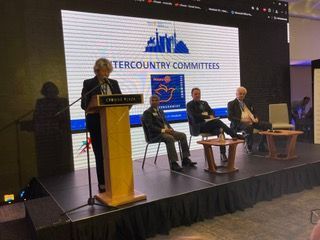
Full colour
Full colour: people on stage
In certain cases, full-colour photographs may be used for speakers, facilitators, participants and committee members.
4.2 Downloads
Backgrounds (8)
Stock photography (13)
Master visual



Graphic pattern 01
PNG
↓
Graphic pattern 02
PNG
↓
Graphic pattern 03
PNG
↓
Virtual meeting · light
JPG
↓
Virtual meeting · dark
JPG
↓
4.3 Master visual
A world without borders
The master visual connects continents, regions, countries and people in the service of peace. Use it for presentation cover slides, flyer covers and other key materials.
Icons for Rotary's seven Areas of Focus are available in the Rotary Brand Center. ICC secondary graphics can be used on backgrounds, certificates, banners and other materials.
5/
Templates & tools
Approved templates for official communication. Items marked Members only are for Executive Council officers, workgroup leads and National Coordinators.
Template
Letterhead
Guidelines p.13 · PDF preferred over print
HTML
Template
Email signature
Guidelines p.14
Template
Business card & NFC digital card
Guidelines p.15
PPTX
Template
Presentation template
Guidelines p.16
Template
Certificates
Guidelines p.18
KIT
Canva / Adobe Express
Social media templates
Guidelines p.26 · TikTok, Instagram, Facebook/WhatsApp
KIT
Template
Newsletter templates
Guidelines p.27 · print magazine & digital
Event materials
Guidelines p.19–23 · roll-ups, outfits, give-aways
Tip from the guidelines: upload the ICC identity assets to the brand kit in Canva or Adobe Express so every post and newsletter stays on brand.
6/
Official brochure
ROTARY ICC
2026
Official brochure · A4
Official brochure
Rotary ICC 2026 · A4 brochure
An overview of ICC to share with clubs, districts and partners. Share it digitally where you can: the guidelines ask to keep printing to a minimum.
PDF · A4
04 · Learning
Learning and development
Self-paced courses, live webinars and recordings that help members, section officers and National Coordinators in their roles.

4 modules · 45 min
Welcome to ICC: orientation
What ICCs are and why they exist
How national sections work
Your first ICC event
Not started
0%

6 modules · 1 h 30
Running an ICC section
Roles and responsibilities
Keeping your section profile up to date
Working with your twin section
Not started
0%

5 modules · 1 h 15
Cross-border projects & global grants
Finding a project partner
Rotary global grants basics
Reporting impact
Not started
0%
OCT
14
Next live webinar
Introduction to global grants for ICC projects
Online · 18:00 CET · 60 min
Recorded sessions
▶
Welcoming Rotaract clubs into your ICC
42 min
▶
Planning a friendship exchange
35 min
▶
Using the brand toolkit
28 min
05 · Knowledge hub
Reference library
Guides, case studies, templates, videos and answers from across the ICC network, searchable in one place.
Sort: Most relevant ▾
Filters
Clear all
Type
✓
Guides
Case studies
Templates
Videos
FAQs
Topic
✓
Peace-building
Friendship exchanges
Youth & Rotaract
Global grants
Vocational exchange
Language
✓
English
French
German
Italian
Spanish
000 resources
Guides ✕
Peace-building ✕
English ✕
Guide
Hosting a friendship exchange
24 pages · EN, FR
Case study
A cross-border water project
8 pages · EN
DOCX
Template
ICC meeting agenda
Editable · EN, FR, DE
VIDEO
Video
Introduction to global grants
18 min · EN subtitles
Guide
Working with Rotaract clubs
12 pages · EN
FAQ
FAQ
Setting up a new ICC
12 questions · EN
…
Frequently asked questions
Can't find what you need?
Ask the Executive Council, or suggest a document, guide or template that would help other sections.